Historical data and live operations are often treated as separate projects. An analytics team studies the past. An engineering team later builds an automation. The definitions drift between the two, and the assumptions found during analysis get lost in the hand-off.
Proxima is designed around a different path: the diagnostic produces an executable workflow definition that can move into the runtime.
It is not a push-button conversion. Integration and production testing still require engineering. The important part is that the meaning of the workflow does not have to be rediscovered.
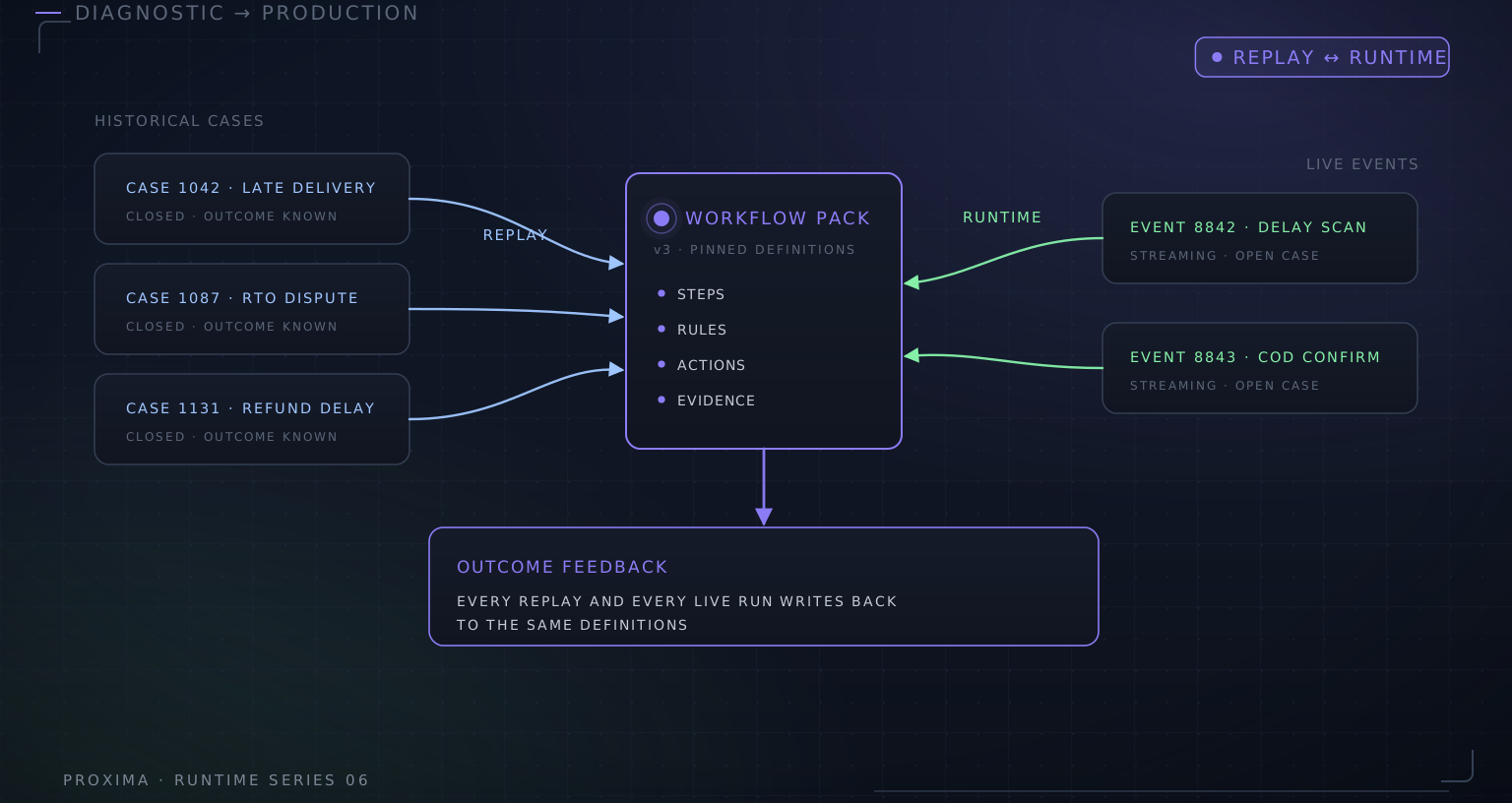
Historical cases ──> Profile and map ──> Workflow definition ──> Replay
│
│
Live source ───────> Event adapter ─────> Same definition ─────> Runtime
│
Next version ←── Outcomes and exceptions
The centre of the diagram is the key design choice. Historical replay and live execution use the same workflow definition. The live system adds persistent cases and action execution, but it does not quietly replace the decision logic that was evaluated during the diagnostic.
Begin with cases, not a process diagram
A process diagram tells us how work is expected to happen. Historical cases show how it actually happened.
For a shipment exception workflow, we might ask for the source record, event times, exception reason, customer priority, action taken, and eventual outcome. We also need enough cases to see ordinary paths, rare exceptions, missing fields, and workarounds.
The diagnostic engine profiles the file before decision logic is introduced. It identifies types, null rates, common values, candidate identifiers, and fields that do not behave as described. This is usually where the first important gap appears.
A broad sample is more useful than a perfectly cleaned one. Cleaning away awkward records may improve an early score while removing the exact cases that determine whether the workflow will survive production.
Map source data into a stable contract
The source fields are then mapped into the workflow pack’s canonical fields. This mapping is reviewed rather than assumed.
For example, expected_delivery, latest_eta, and carrier_eta may sound interchangeable but represent different moments in different systems. Choosing the wrong one can make every delay calculation look precise and still be wrong.
The approved mapping becomes part of the implementation record. Derived facts are calculated on top of canonical fields, not raw column names.
Encode the first decision path
The workflow team turns observed decisions into explicit logic. Straightforward policy becomes rules. Ambiguous text or document interpretation becomes a candidate bounded model step. Cases without enough evidence get a defined fallback rather than a guessed answer.
Each rule carries more than a condition. It records the classification, severity, proposed action, confidence, reason, and diagnostic context. The output is a structured recommendation that can later map into the runtime’s action proposal contract.
This stage often exposes disagreements between team members. That is useful. A workflow cannot be implemented consistently when its owners use different policies for the same case.
Replay and inspect the disagreements
The diagnostic runner applies the workflow pack to historical records and compares its recommendations with recorded outcomes.
The comparison should not collapse everything into “accuracy.” Proxima separates exact matches, partial matches, mismatches, uncertain cases, missing ground truth, and excluded records. Rule coverage and data-quality gaps are reported separately.
A mismatch is a prompt for investigation:
- Was the source field mapped correctly?
- Did the historical operator have information absent from the data?
- Is the workflow rule incomplete?
- Was the recorded action itself a workaround or mistake?
- Are two valid actions being treated as different labels?
The answers improve the event contract and workflow pack before live integration begins.
This takes longer than optimising a single accuracy number. It produces a better implementation boundary. Some disagreements belong in the workflow; some reveal missing source information; others show that the historical action was not a reliable reference. Treating them all as model errors sends engineering effort to the wrong place.
Carry the same definition into runtime
Once the workflow is worth pursuing, the pack becomes the decision definition used by the runtime. The live adapter maps incoming events into the same canonical fields used during replay. The tested pack’s derived-field and rule engines produce the first runtime decisions.
This continuity removes a common failure point. The proof is not reimplemented as a separate set of service conditions or copied into a prompt. The pack is designed so that the version tested on historical cases is the version connected to live events.
The shared definition also creates a clean release decision. When the workflow changes, the candidate version can be compared against both the original diagnostic set and newer production cases. The team can see intended changes, unexpected regressions, and cases that remain unresolved before promoting it.
The runtime then adds what a diagnostic does not need: case correlation, persistent state, action proposals, operator work, execution records, retries, and live outcomes.
Test the integrations without changing the decision
Before production actions are enabled, source and target adapters are tested against fixtures, sandboxes, or mock systems. The question at this stage is whether the right event reaches the workflow and whether the resulting action can be expressed correctly in the target system.
Keeping this separate from decision tuning makes failures easier to diagnose. If the proposed action is wrong, inspect the mapping and workflow. If the proposal is right but the target call is wrong, inspect the adapter.
Compare live cases with the historical baseline
Live traffic will contain cases the historical sample did not. Sources will arrive at different times. Operators will reveal information that was never captured in the original export.
The early runtime period is therefore another measurement stage, but it uses the real event path. Decisions and outcomes are attached to case records and can be compared with the diagnostic baseline.
When a gap is found, the team updates the relevant layer: source mapping, derived field, workflow decision, model component, or action adapter. A candidate pack version can be replayed against the original case set and newer live cases before release.
Build a repeatable route, not a one-off hand-off
The value of the diagnostic is not the report by itself. It is the set of executable assets produced along the way:
- A canonical event contract
- Reviewed source mappings
- Derived operational facts
- A versioned workflow pack
- Historical evaluation cases
- An action catalogue
- An integration plan
Those assets shorten the path to a running workflow and remain useful after launch. They also make the next change less dependent on whoever remembers the original project.
The route from history to runtime is where Proxima’s diagnostic work and product architecture meet. One establishes whether the decision is worth automating. The other gives that decision a durable place to run.